

Using AI to Personalize Learning: Larisa Black
Using AI to Personalize Student Learning

Larisa Black was facing an issue that plagues many teachers: How could she keep up with all of her administrative tasks, personalize lessons to various students and still find time for creative lessons?
While some teachers shied away from using AI in their classrooms, Black realized that in this new technology, she might be able to find a solution to balancing her many demands by embracing these tools instead.
She set out to find creative ways to integrate AI into her lessons in a way that would create personalized learning for her students without taking away from the creative process. From creating classroom chatbots to making the limitations of AI a part of the classroom discussion, Black found ways to make AI work for her and her students.
The Educator
When earth science teacher Larisa Black covered weather and erosion with her students, she wanted to do it in a way that was interactive and compelled her students to use critical thinking skills.
If we are not training students on how to use it, they will use it in the way they want to use it. Have we taught them how to use it as a thought partner so it doesn’t take away their voice?
As a teacher in a virtual K-12 public school, South Carolina Connections, she regularly uses technology to provide interactive and engaging learning activities for her students.
She emphasized the importance of teaching students how to use AI responsibly, stating, “If we are not training students on how to use it, they will use it in the way they want to use it. Have we taught them how to use it as a thought partner so it doesn’t take away their voice?”
She wanted to see how she could use artificial intelligence to support critical thinking, so she took the opportunity to integrate AI with Yellowstone National Park to create real-world solutions to erosion.
How Have You Used AI in Your Classroom?
Black shared that AI has allowed her to personalize learning for her students while supporting them to think deeper during live lessons. For example, she recently used an AI tool to create a class-specific chatbot to guide student thinking during the lesson.
Students were learning about the effects of weather and erosion on the environment and how solutions can have unintended consequences.
In collaborative teams, students had to develop solutions for weathering and erosion in Yellowstone National Park. She developed an AI chatbot for students to interact with and share their solutions.
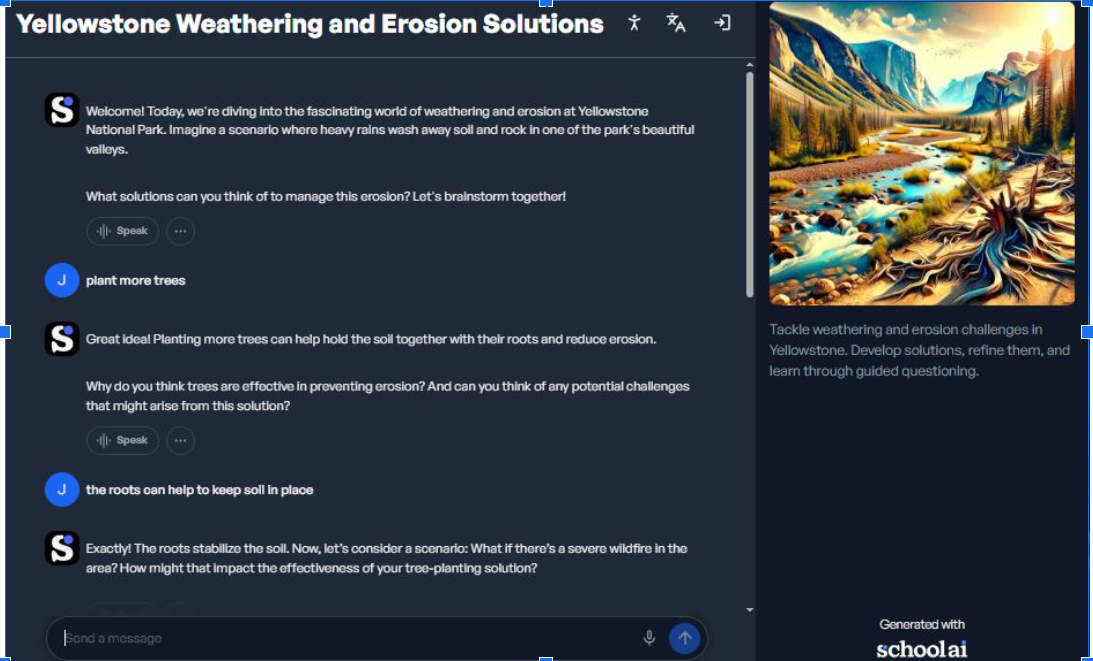
Students could share a potential solution for the erosion issue, and the chatbot would respond with contrasting scenarios or potential consequences of their solution for the environment.
The bot was also able to ask probing questions to help students think deeper about their solutions. The AI tool captured each team’s chat so she could review how students were thinking and iterating through the problem.
Students appreciated the ability to receive immediate feedback on their potential solutions so they could continue to think through and refine their work.
Moreover, this tool will “red flag” potential signs of mental health struggles or other potentially dangerous information and immediately notify the teacher.
What Has Been the Impact of AI on Your Teaching and Learning?
AI has been a game-changer for Black. As a 16-year veteran teacher, she noted it saves her time on administrative tasks and lesson planning, allowing her to be more creative in her lesson planning.
AI tools also help to accommodate all learning needs, enabling students to change the language, read aloud or dictate their responses. As she has implemented different tools, she has seen increased engagement, and using AI has opened up conversations with students about how best to use AI:
- How does it work?
- What are its limitations?
Students become familiar with its strengths and limitations as they use it more as part of the learning process.
In another assignment, students first completed a presentation without AI. Then, she let them run the presentation through the AI tool in the app. It helped polish her students’ presentations, but more importantly, students saw the difference between their voice and the AI’s “voice.”
This experience allowed her to have a conversation with her students on how to better use AI so their voices aren’t lost.
Beyond teaching, Black also provides professional development on AI and technology across her district. In her sessions with other teachers, she starts by easing their fears by showing them the fun and time-saving things AI can do. She then guides discussions about the ethics of using AI with and for students and problem-solves common issues with using AI in the classroom.
What Tips or Tricks Can You Give Educators Who Want to Start Using AI?
Black’s biggest tip is to start using it.
She encourages teachers to try some free versions of various tools until they find one they like. She also emphasized the importance of specific prompting and the need to iterate prompts until they get what they need.
Supporting Personalized Instruction
Black’s use of AI allows her to personalize instruction during live lessons and asynchronous assignments. It allows students to receive in-the-moment feedback along with open-ended questions to deepen their understanding and thinking about a topic.
With relative ease, students are able to change languages, request analogies about a topic to a subject matter they are more familiar with and guide their problem-solving process by testing various solutions.