

Using AI to Gamify Protein Electrophoresis: David Garcia
Reduce Administrative Work
 Biology teacher David Garcia had an
idea for a card game to get his students thinking about a complex
biology system, but like many teachers, he didn’t have the time
to make the game himself.
Biology teacher David Garcia had an
idea for a card game to get his students thinking about a complex
biology system, but like many teachers, he didn’t have the time
to make the game himself.
Instead, he turned to his assistant, stated what he was looking for from the game, and had the assistant build it for him based off Garcia’s ideas and knowledge.
Later, when he tested the game with the class, he gave his students the chance to say what they liked and didn’t like about the game.
Taking the best of this insight, he was able to create more instructions for his assistant to make the game even better for the next time the class played it.
The assistant was even able to create designs for the cards for him – something that may not have been something Garcia could have made time to do, even if he had the skill.
Of course, just like most teachers, Garcia’s school had never actually hired a personal assistant for him. Instead, he used AI to create his own.
Through guided prompts, Garcia was able to use AI as it should be used: as an assistant to help him with tasks based off his own prompts and ideas.
The Educator
David Garcia, a high school biology teacher at NeoCity Academy in Kissimmee, Florida, integrates AI into his teaching to improve classroom management, lesson planning and student engagement.
He has used AI chat tools to streamline administrative tasks and develop innovative learning activities.
How Have You Used AI in Your Classroom?
Garcia used ChatGPT-4o to create a strategic seating chart based on anonymous student data, ensuring balanced group dynamics and behavioral management.
He also leveraged AI to design an educational card game that helps students practice protein electrophoresis, using AI-generated prompts to refine game mechanics and create engaging visuals.
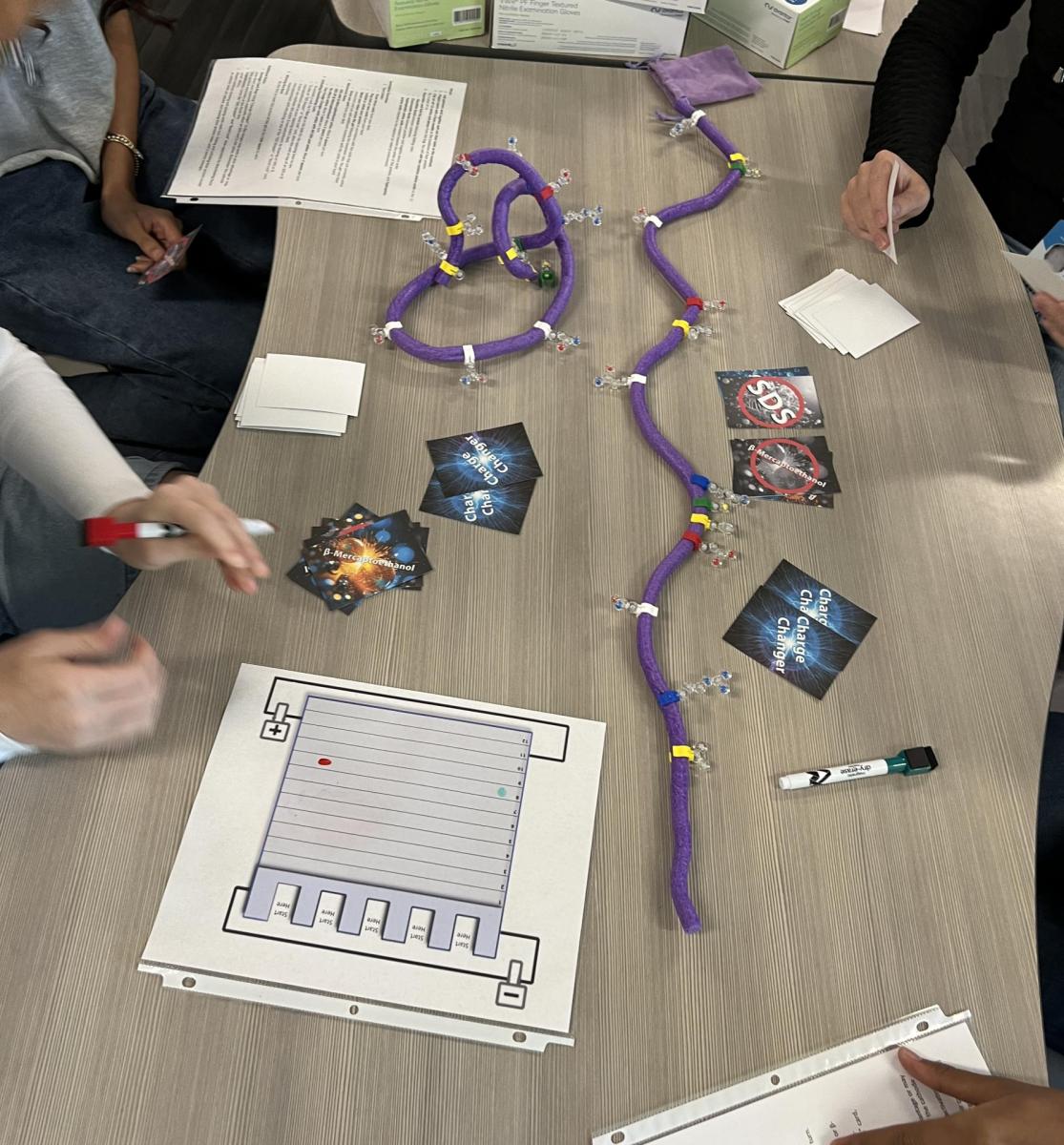
Students started by building their own protein models using foam noodles as the protein backbone and plastic amino acid pieces from his amino acid starter kit.
Students carefully followed protein folding rules like forming disulfide bonds and creating charge interactions.
As the game progressed, students played cards to manipulate their protein’s structure and race across a simulated SDS-PAGE gel grid. They learned how factors like SDS, beta-mercaptoethanol and amino acid charge affect protein unfolding and movement.
After playing the game, Garcia asked students to give him some feedback on what they liked about the game and what could be improved. He reviewed the responses and will take the best suggestions and consolidate them into prompts to feed back into the AI chat tool to rewrite instructions and improve game mechanics.
Students also recommended having one design on the back of each card that stays the same. He plans to use AI to help generate a design that represents the entire game and can be used on the back of each card.
Additionally, AI assisted him in lesson planning and content review, particularly for complex topics like protein structure analysis, by generating structured explanations and analogies for students.
What Has Been the Impact of AI on Your Teaching and Learning?
By optimizing seating arrangements, classroom dynamics improved, leading to fewer disruptions and increased student collaboration.
The AI-assisted card game transformed a complex lab technique into an interactive and engaging learning experience, enhancing student understanding and retention.
Using AI for lesson planning saved significant time and allowed Garcia to introduce advanced industry-grade tools like Protein Data Bank, making professional-level content more accessible to students.
What Tips or Tricks Can You Give Educators Who Want to Start Using AI?
Garcia advised educators to view AI as a teaching assistant rather than a replacement, using it to enhance — not dictate — lesson design. He stressed the importance of verifying AI-generated content and encouraged teachers to experiment with AI for brainstorming and efficiency while maintaining their subject expertise.
View AI as a teaching assistant rather than a replacement, using it to enhance — not dictate — lesson design.
Garcia suggested starting small, like using AI for structuring ideas or simplifying administrative tasks, and gradually integrating it into classroom instruction.
AI as a Classroom Assistant
Pillar 2 of the AI in K-12 Instruction framework leans into using AI as a virtual assistant in the classroom.
Garcia used AI to not only help with strategically creating a seating chart to maximize collaboration but also used AI as a planning tool.
He created an engaging and fun activity that supported students in developing a deeper understanding of a complex laboratory technique.